Something quietly changed on June 3, 2026 — and if you missed it, your SEO reporting just has a blind spot in it.
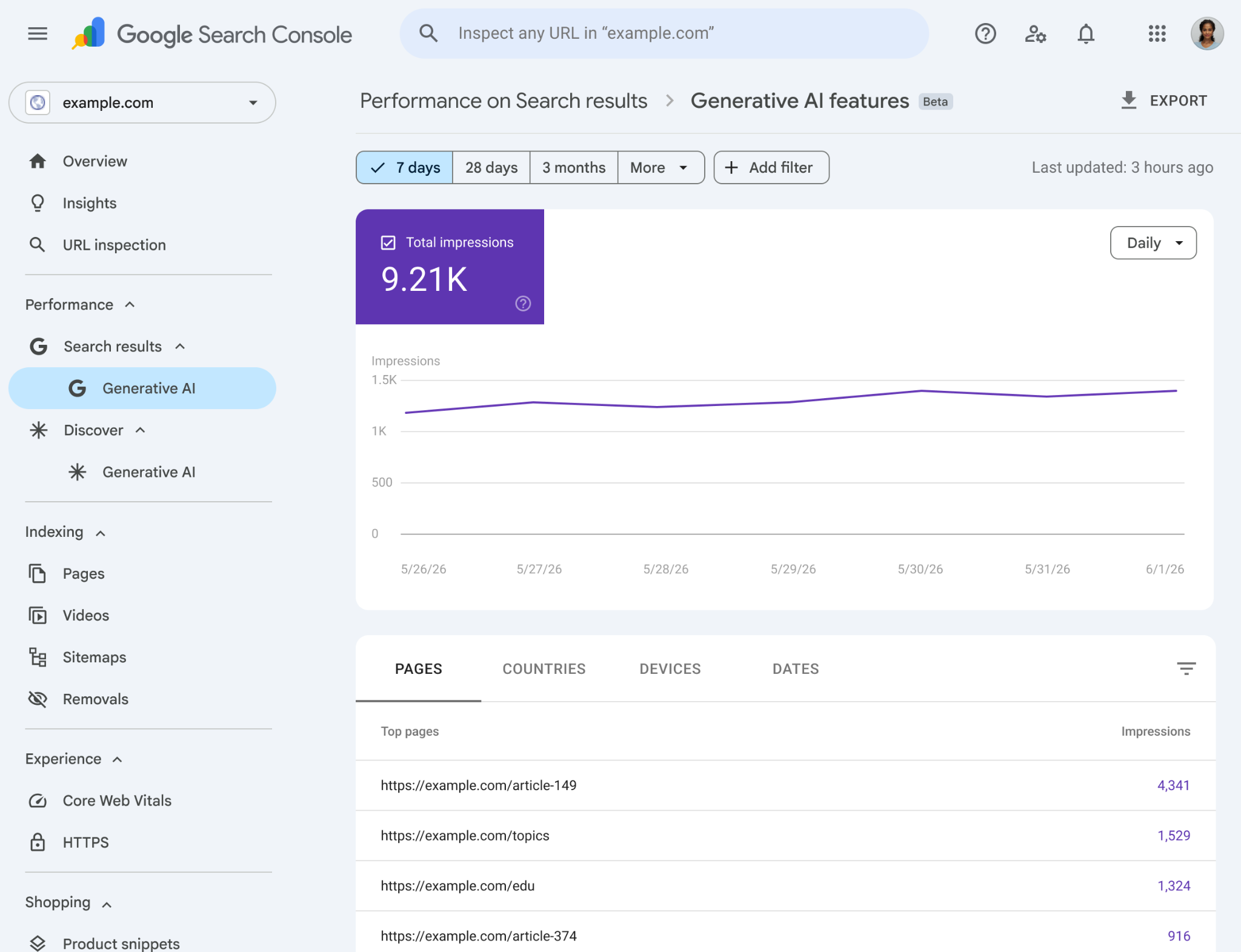
Google launched a dedicated Google Search Console AI Overview performance report. For the first time, you can see exactly how often your pages show up inside AI Overviews, AI Mode, and Discover’s generative AI features — in a separate, clean view, not buried inside your standard Performance report.
I’ve been waiting for this since AI Overviews went mainstream in 2024. Back then, every time I pulled up a client’s Search Console data, I had no way to separate which impressions came from normal blue links and which came from AI-generated answers sitting above everything else. That guessing game is now over.
Here’s everything you need to understand about this update — what it shows, what it doesn’t, and what you should actually do with it.
What Is the Google Search Console AI Overview Report?
The Generative AI Performance Report is a brand-new, standalone section inside Google Search Console. It sits alongside your existing Performance report — it doesn’t replace it.
This dedicated report tracks your site’s visibility inside Google’s AI-powered search features:
- AI Overviews — The AI-generated summaries that appear above organic results
- AI Mode — Google’s newer, fully AI-driven search experience
- Generative AI in Discover — AI-influenced cards in the Discover feed
Before this, all that data was mixed into your overall impression count with no way to filter it. A spike in impressions could mean you ranked higher — or it could mean Google started citing you in AI answers. You had no idea which.
Now you do.
What Data Does the Report Actually Show?
Let’s be clear about what’s in the report and what isn’t — because the gap matters.
What You Get
- Impressions — How many times your URLs appeared inside generative AI features
- Pages — Which specific URLs are being cited inside AI responses
- Countries — Where your AI impressions are coming from geographically
- Devices — Desktop vs. mobile breakdown of AI feature appearances
- Dates — Day-level trend data so you can spot shifts over time
❌ What’s Missing (For Now)
- Click data — Google is not telling you how many people clicked through from an AI response to your site
- Query-level data — You can’t see which search queries triggered your content to appear in AI Overviews
- CTR — No click-through rate for AI feature impressions
The missing click data is the big one. Zero-click search has been a growing concern since AI Overviews launched. People see an AI-generated answer and never scroll down to your link. Google knows this. Giving SEOs click data from AI responses would make that problem very visible, very fast.
That said, impression data alone is still genuinely useful — and I’ll show you why in a moment.
A Real-World Case Study: What AI Impressions Tell You
Let me walk through a realistic scenario I’ve seen play out across several sites I consult on.
The situation: A health and wellness blog saw their standard organic impressions hold steady from January to April 2026. Traffic was flat. Rankings looked fine. The client assumed nothing had changed.
What the new report revealed: When we got access to the Generative AI report in June, their AI Overview impressions told a completely different story. Pages covering “symptoms of iron deficiency” and “vitamin D dosage for adults” were getting cited heavily inside AI Overviews — but almost none of that was translating to clicks, because Google’s AI answer was comprehensive enough to satisfy the query.
The insight: Their content was authoritative enough to be cited by Google’s AI, but not structured well enough to pull readers through. The fix wasn’t about ranking higher — it was about making their content do more work: deeper guides, clear CTAs, proprietary data, and things the AI summary couldn’t replicate.
Without the dedicated AI report, this would have been invisible.
How to Access the Generative AI Performance Report
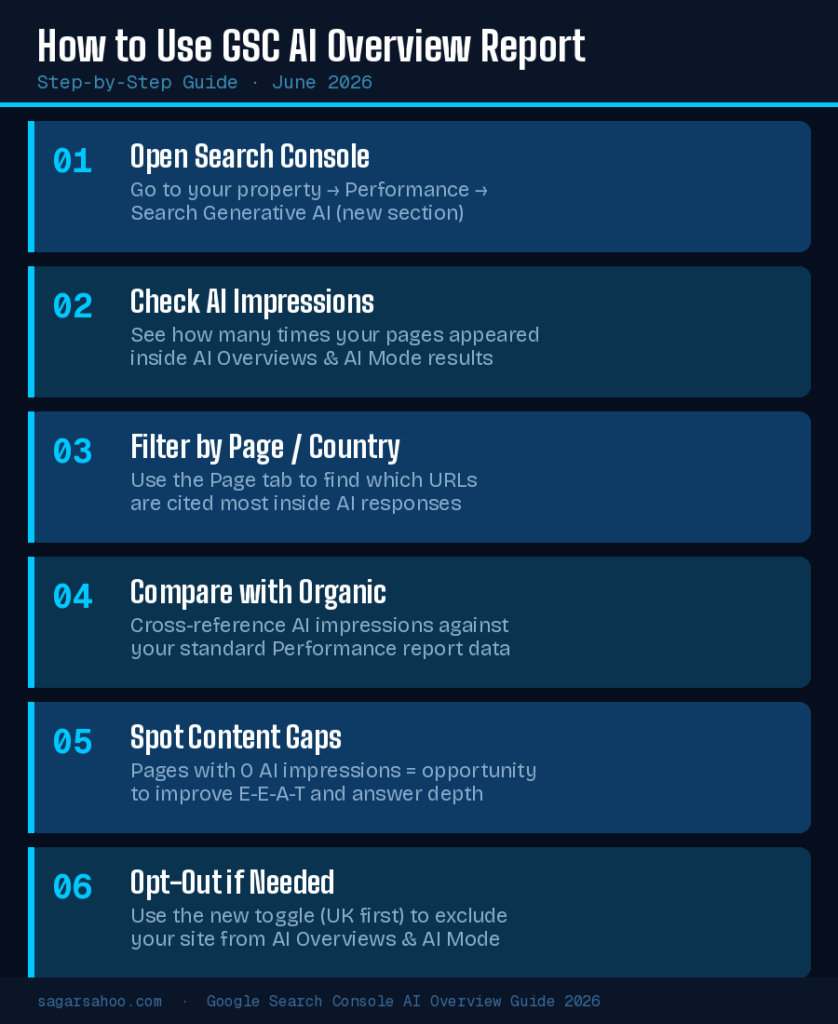
Here’s the step-by-step process to find and use this data right now.
Step 1: Log into Google Search Console
Go to search.google.com/search-console and select your property.
Step 2: Look for the new “Search Generative AI” section
In the left-hand navigation, you should see a dedicated section for Generative AI performance. If you don’t see it yet, your property may not have access — the rollout started with a subset of sites in the UK and is expanding globally.
Step 3: Check your AI Impressions over time
The chart view shows impression trends. Look for spikes or drops that don’t match your standard Performance report. These deltas are where the story lives.
Step 4: Switch to the Pages tab
This shows you exactly which URLs are appearing inside AI features. Sort by impressions descending. Your most “AI-visible” pages may surprise you — they’re often not your top-ranked pages.
Step 5: Cross-reference with the standard Performance report
Pull the same date range in both reports. If a page has strong AI impressions but weak standard impressions, your content is being cited by AI but not ranking prominently on its own. That’s a signal to improve topical depth and E-E-A-T signals.
Step 6: Check Countries and Devices
If you’re targeting specific markets, the geographic breakdown tells you whether your AI visibility aligns with your audience. Mobile vs. desktop splits can inform content formatting decisions.
Why This Report Changes SEO Strategy in 2026
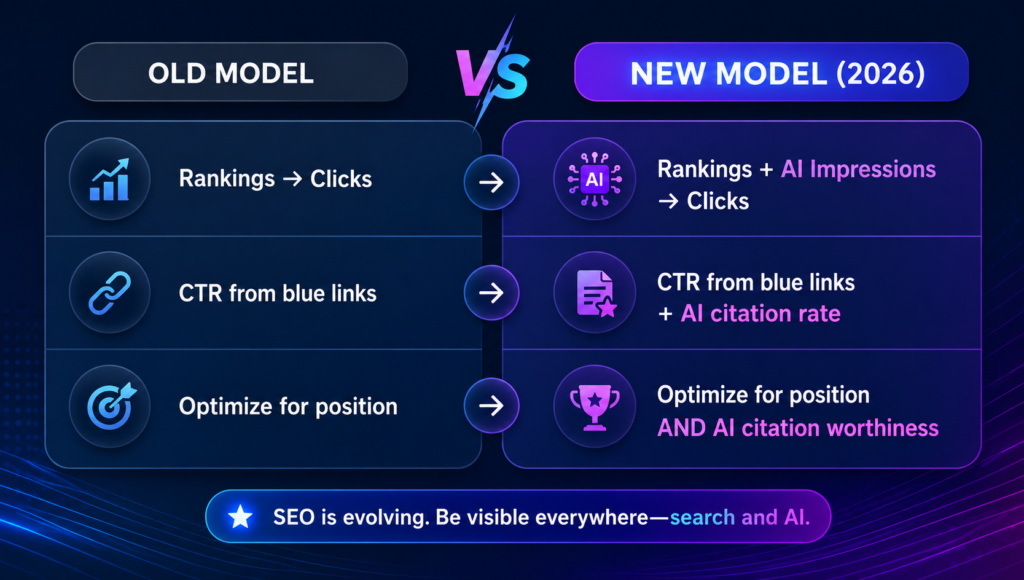
For years, we optimized for rankings. Rank #1, get clicks. Simple.
AI Overviews broke that model. You can show up in position 1 AND still get fewer clicks than before, because an AI summary answers the query before anyone reaches your link.
The Google Search Console AI Overview data gives us a new measurement layer. Think of it as a second funnel running parallel to organic search:
Content that earns high AI impressions shares consistent characteristics in my experience across client sites:
- Factual depth — It goes beyond surface-level answers
- Structured formatting — Clear H2/H3 hierarchy, numbered steps, tables
- E-E-A-T signals — Author credentials, first-hand experience, citations
- Concise, quotable passages — Sentences Google’s AI can lift and use cleanly
- Freshness — Updated content with a visible date and recent additions
If your pages are getting AI impressions, protect and expand them. If they’re not, treat those pages as optimization targets.
The Opt-Out Toggle: Should You Block AI Overviews?
Here’s something that’s been flying under the radar: alongside the new report, Google is also testing an opt-out toggle inside Search Console.
This control lets you exclude your site from appearing in AI Overviews, AI Mode, and generative Discover features — while keeping your regular organic search and Discover listings intact.
Why does this exist? The short answer: regulatory pressure. The UK’s Competition and Markets Authority (CMA) mandated this under the Digital Markets, Competition and Consumers Act 2024. It’s a world-first — the first legally binding requirement for a search engine to give publishers genuine control over AI feature inclusion.
Should you use it?
Probably not for most sites. Here’s my thinking:
- If your content gets cited in AI Overviews, it signals authority — even if clicks don’t follow immediately
- AI search is only going to grow; removing yourself now is a short-term decision
- Exception: if your business model depends entirely on driving traffic (publishers, affiliate sites), and your AI impressions show zero click correlation, opting out may be worth testing
I’d recommend monitoring for at least 60 days before touching the toggle.
What’s Still Missing — and What Google Should Add
The report is a step forward. But as it stands, there are real gaps that limit its strategic value.
Missing: Query data
Knowing which questions trigger your AI appearances is critical for content planning. Without it, you’re flying partially blind.
Missing: Click data
This is the most important metric for understanding the actual value of AI visibility. Google says they’re “continuing to work with website owners to understand what insights will be most helpful.” Translation: more data is coming, but not yet.
Missing: Comparison to competitors
Knowing your AI impressions is useful. Knowing how they compare to competing sites in the same topic area would be transformational.
Missing: Rollout to all properties
As of June 2026, the report is live for a subset of sites. If you don’t see it yet, you’re not alone — patience is the only option here.
FAQ: Google Search Console AI Overview Report
What is the Generative AI Performance Report in Search Console?
It’s a new, dedicated section in Google Search Console launched on June 3, 2026, that shows how often your site’s pages appear inside AI-powered features like AI Overviews, AI Mode, and generative AI in Discover — separately from standard organic performance data.
Does the Google Search Console AI Overview report show click data?
No. As of the current launch, the report only shows impressions, pages, countries, devices, and date trends. Click data and query-level information are not included, though Google has indicated more metrics will be added over time.
How do I access the AI Overview performance report in Search Console?
Log into Google Search Console, select your property, and look for the “Search Generative AI” section in the left navigation. Note that the rollout is phased — not all properties have access yet.
Can I opt out of Google AI Overviews through Search Console?
Yes, Google is currently testing an opt-out toggle in Search Console (rolling out in the UK first) that lets you exclude your site from AI Overviews, AI Mode, and generative Discover features while keeping standard organic listings intact.
What does it mean if my pages have zero AI Overview impressions?
It likely means your content isn’t being selected by Google’s AI as a citation-worthy source for those queries. Focus on improving content depth, structured formatting, E-E-A-T signals, and ensure your pages provide comprehensive, accurate answers to the questions they target.
Key Takeaways
The Google Search Console AI Overview report is the most significant data transparency move Google has made since AI Overviews launched. It doesn’t give you everything — click data is the glaring gap — but it gives you something that didn’t exist before: a direct view into how Google’s AI sees your content.
Here’s what I’d do right now:
- Check if you have access — log in and look for the Generative AI section
- Identify your highest AI-impression pages — these are your current AI authority signals
- Find your zero-impression pages — treat them as content upgrade priorities
- Don’t obsess over the missing click data — impressions are still a meaningful authority signal
- Wait before touching the opt-out toggle — give it 60 days of data first
If you want help reading this data across your specific site or building a content strategy around AI search visibility, book a free SEO consultation — I’m working with several sites on exactly this right now.