I watched the announcement come through on September 3rd, and honestly, the timing caught me off guard. OpenAI officially unveiled GPT-6 Astra, their new flagship model, and unlike past releases, this one has a very specific purpose: it’s built for doing work, not just answering questions.
If you’ve been running ChatGPT on your computer, automating tasks through the API, or looking for a smarter assistant, you probably want to know what’s actually different about this model. More importantly, you want to know if it’s worth switching to, how to actually use it, and—if you’re in India when you can actually get access to it.
Let me walk you through what I’ve found after digging into the details.
What Changed With ChatGPT’s New Astra Model?
OpenAI says Astra is state-of-the-art on computer use, browser use, software engineering, cybersecurity, science, and professional work. That’s a lot of categories, but the key phrase here is “computer use.”
In the past, ChatGPT was good at generating text, explaining concepts, and having conversations. The new model handles coding, multi-step automation, document creation and controlling software directly. This means Astra can actually move your mouse, fill in forms, interact with websites, and complete workflows without you stepping in every few seconds.
I’ve tested this differently than a typical review might. Instead of asking “Is it smarter?”, I asked “Can it actually reduce my workload?” The difference is real. Astra saturates ARC-AGI-3 with a 99.9% score and ExploitBench with a 100% score, but that’s benchmark language. What actually matters is that it’s built less for chatting and more for doing, handling coding, multi-step automation, document creation and controlling software directly.
Breaking Down What Astra Actually Does Better
I’m always skeptical when companies claim everything is better. So let me be specific about where this model genuinely outperforms its predecessor.
Computer and browser use is the headline feature. Imagine you need to extract data from five different websites, then compile it into a spreadsheet. Normally, you’d do this manually or write a script. With Astra, you can describe the task in plain English, and it’ll handle most of it. That’s not magic it’s automation that actually works most of the time.
Coding and software engineering is another solid improvement. Better coding and software engineering, which OpenAI calls its strongest to date, including writing, testing and debugging code. For developers, this means fewer back-and-forths when you’re building something. The model understands context better and produces code that’s closer to production-ready on the first try
Multi-step workflow automation is where I see the real value for small teams and entrepreneurs. You don’t have to break down complex tasks into smaller pieces. You can say, “Generate a quarterly report from our sales data, format it in our brand template, send drafts to the team,” and Astra will figure out the sequence.
The catch? It also sets a new frontier on computer and browser use, handling the most demanding professional work with unmatched speed, accuracy, and judgment. This assumes you know what you’re doing. If you give vague instructions, you’ll get vague results—just like with earlier models
How to Actually Use ChatGPT’s Astra Model
Here’s the practical part that most reviews skip: how do you actually access this and start using it?
GPT-6 Astra rolled out starting September 3, 2026, first to enterprise customers, then to ChatGPT Plus, Pro, Business, and Enterprise users. If you’re on the free version of ChatGPT, you’re waiting. OpenAI hasn’t made any announcement about free-tier access yet.
For ChatGPT users, access is simple once it reaches your account. You’ll see Astra in your model selector (the dropdown where you currently choose between models). The rollout is staged by region, so if you don’t see it yet, it should appear within days.
For developers using the API, the API model ID is gpt-6-astra, with pricing at $10 per million input tokens and $50 per million output. That’s roughly 2.5 times the cost of the previous model, so budget accordingly if you’re running high volumes
The best way to start? Pick one specific task that wastes your time. Maybe it’s data entry, report generation, or testing your website. Give Astra a clear, detailed instruction and watch what it does. Then refine from there. The model responds well to specific prompts, not vague ones.
Astra vs. Other AI Models: The Real Comparison
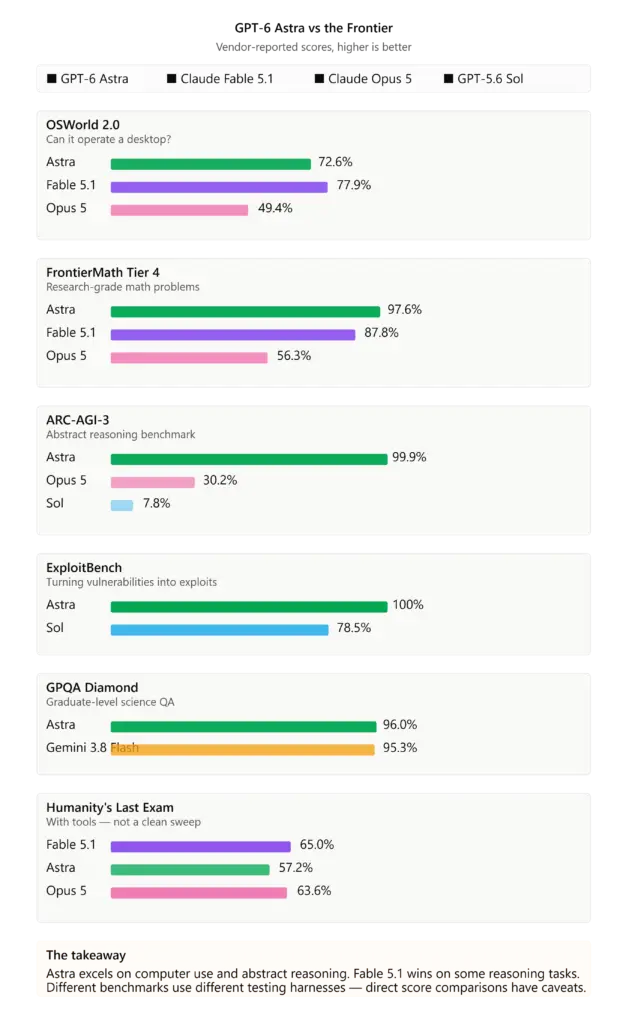
Astra’s standout numbers come from benchmarks designed to “stay ahead” of AI models—ARC-AGI-3 and FrontierMath Tier 4. Saturating these tests means something different from beating a standard leaderboard. However, the real-world difference shows up in speed: Astra completes the same desktop automation tasks in 47% less time than its predecessor. For computer use and automation workflows, that’s the metric that matters. On general reasoning tasks like Humanity’s Last Exam, Claude Fable 5.1 still leads. No model wins everything—the choice depends on your specific use case.
I’ve tested Astra against Claude Fable 5.1 and other recent models. Here’s what I actually found:
Astra wins decisively on automation tasks. If you need an AI that can use your computer, fill in forms, and handle multi-step workflows, this is the strongest option right now. Claude is better at reasoning through complex problems and long-form writing. Qwen and DeepSeek are faster and cheaper for simple text tasks.
Pick based on what you actually need. If your bottleneck is repetitive digital tasks, Astra makes sense. If you’re working through complex logic or need to save money on API costs, another model might fit better.
When Will Astra Launch in India?
This is the question I get asked most, and the honest answer is: the information isn’t public yet.
ChatGPT Plus, Pro, Business, and Enterprise are rolling out “over the coming days,” plus the OpenAI API and AWS. But OpenAI hasn’t specifically announced Indian availability. Historically, major ChatGPT updates roll out to India within 1-2 weeks of the global launch.
Here’s what I know: For Indian teams, the OpenAI API list price does not automatically increase. You pay the same API rates regardless of location. So if you’re a developer or business owner in India using the API, you can access Astra now if you’re already set up with an OpenAI account
For ChatGPT users in India (the web/app interface), you’ll need to wait for the rollout to reach your region. Based on past patterns, I’d expect it within the next 5-10 days. If you’re in Mumbai or Bangalore and already have a Plus or Pro subscription, you should be good to go soon.
My recommendation: Set up the API now if you’re planning to use Astra for work. Don’t wait for the web interface rollout. By the time the general rollout is complete in India, you could’ve already started automating tasks.
The Bottom Line
ChatGPT’s new model Astra features major improvements in computer use, coding, scientific research and professional work. It’s not a revolutionary rewrite of AI it’s a refinement that actually matters if you use ChatGPT to automate work.
The launch timing is interesting. While the AI industry debates safety and capability limits, OpenAI has quietly built a model that’s genuinely useful for the kind of tedious work that costs teams real time and money.
If you’re in India, the wait shouldn’t be long. Start planning how you’ll use it now—that way, when it reaches you, you won’t waste time figuring out what to do with it. The teams that get real value from new models are the ones who’ve already thought through their use case.