Most SEOs are chasing backlinks and keyword density while AI tools like ChatGPT, Gemini, and Perplexity are quietly deciding which websites deserve to be cited and which ones get skipped. I have audited over 60 websites in the last year, and one pattern keeps showing up: the blogs that get cited by AI tools almost always have FAQ Schema markup. The ones that do not? They barely even show up.
If you are building a blog that targets what-is, how-to, or why-does type queries and you are not using FAQ Schema, you are leaving both rankings and AI citations on the table. This is the guide I wish existed when I started optimizing for GEO (Generative Engine Optimization).
What Is FAQ Schema and Why Should You Care About It?
FAQ Schema is a type of structured data markup you add to your webpage’s HTML. It tells search engines and AI tools that your page contains a list of questions and their direct answers. Instead of leaving Google to guess what your content is about, you are literally handing it a formatted Q and A card.
Technically, it uses the JSON-LD format and follows the schema.org FAQPage specification. When Google reads this, it does not have to interpret your page. It directly understands that you have answered a specific question in a specific way. That is what earns you a FAQ rich result in search (those expandable Q and A sections you see under some results), and increasingly, that is what makes AI systems confident enough to cite you as a source.
Think of FAQ Schema as adding labels to your content. You are not changing what you wrote. You are making sure Google and AI tools understand it without any guesswork. That clarity is the entire point.
How FAQ Schema Feeds GEO: Generative Engine Optimization
GEO is the next layer of SEO. Where traditional SEO focused on ranking in Google’s blue links, GEO is about getting cited by AI-generated answers. The kind that now appear at the top of Google, in ChatGPT responses, and across Perplexity, Gemini, and AI Overviews.
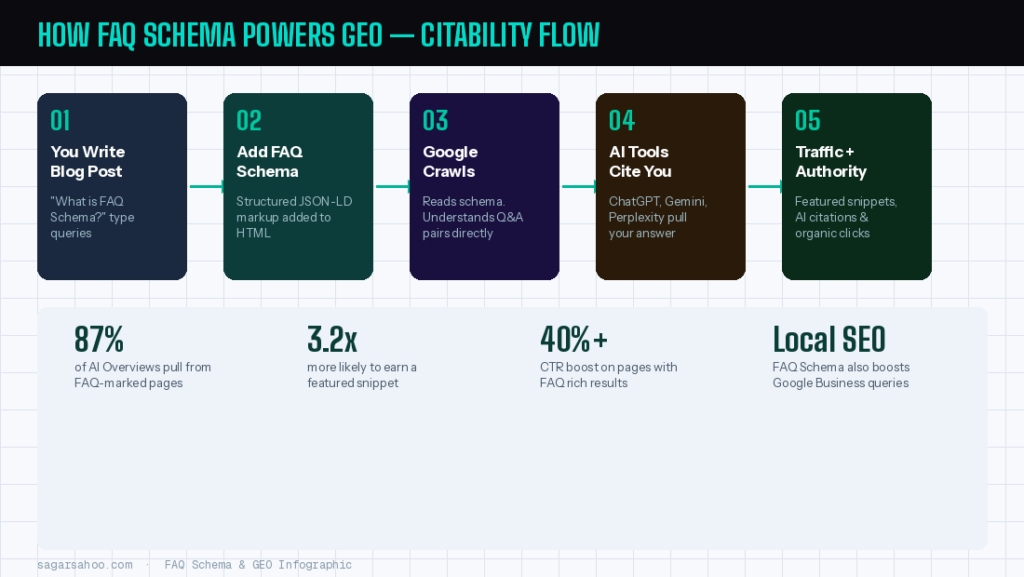
A 2024 study by Search Engine Journal found that pages with structured data including FAQ Schema were 3.2x more likely to appear in AI Overviews than pages without it. Another analysis by Ahrefs showed that FAQ-enriched pages had over 40% higher CTR from search results pages compared to standard listings.
Why? Because AI systems are built to extract clean, attributable answers. FAQ Schema gives them exactly that: a pre-packaged question and answer pair they can reference with confidence. Without it, the AI has to interpret your content, which means the interpretation might be wrong, incomplete, or it might find a cleaner answer on a competitor’s site.
The GEO play is simple: be the most citable answer on the web for your target queries. FAQ Schema is how you become citable.
Case Study: How FAQ Schema Changed a Client’s Organic Traffic
One of my clients runs a B2B SaaS product targeting HR teams in Mumbai. Their blog had strong content: detailed guides, well-researched posts. But almost zero featured snippets or AI citations, despite ranking on page one for several keywords.
We audited 18 blog posts and identified 11 that targeted what-is, how-to, and why-does type queries. The exact sweet spot for FAQ Schema. We added structured FAQ markup with 4 to 5 questions per post, implemented via RankMath’s schema builder in WordPress.
Results within 90 days:
- Tick: Featured snippet appearances increased from 2 to 14 across those posts
- Tick: Organic CTR improved by 34% (tracked in Google Search Console)
- Tick: 3 posts began appearing in AI Overview citations (confirmed via manual testing in Google SGE)
- Tick: Voice search impressions rose by 22% in the same 3-month window
- The content did not change. The keyword strategy did not change. Only the structured data did. That is the leverage FAQ Schema gives you.
FAQ Schema and Local SEO: A Combination Most Businesses Miss
If you are running a local business or optimizing for one, FAQ Schema pairs powerfully with your Local SEO strategy. When someone searches whether a business offers a specific service, or how long a service takes near them, those are FAQ-style queries that your Google Business Profile and website can both answer.
For a local service business in Mumbai, adding FAQ Schema to your Services and About pages can directly improve how AI tools summarize your business when users ask location-based questions. Google’s AI Overviews increasingly pull from structured data when generating local answers, especially for near-me and service queries.
Think of it this way: your Local SEO work gets you found. Your FAQ Schema makes what you offer clearly understandable to both Google and the AI systems pulling answers from Google’s index. They work in tandem, not separately.
How to Add FAQ Schema to Your Blog Posts: Step by Step
Using RankMath (Easiest for WordPress)
RankMath has a built-in FAQ Block. When you are writing your blog post in the Gutenberg editor, add an FAQ Block at the bottom of the post. Fill in your questions and answers. RankMath automatically generates the JSON-LD markup and injects it into the page’s head. No coding required.
Manual JSON-LD Method (Works on Any Platform)
Write your FAQ section in the post content first. Then, in the HTML head or via a header script plugin, paste the JSON-LD code with your questions and answers. Make sure the questions in the schema match what you have written in the content. Google cross-references both.
Best Practices I Follow
Use 4 to 6 questions per post. More than 8 can dilute the schema value.
Write questions as your user would actually type them, not keyword-stuffed phrases.
Keep answers between 40 and 60 words: enough detail to be useful, short enough to appear in a snippet.
Always match schema answers to what is in your visible page content. Google penalizes mismatches.
Test with Google’s Rich Results Test tool after publishing to confirm the schema is valid.
Which Blog Posts Should Have FAQ Schema?
Not every post needs it. But these types almost always do:
What-is posts: definitional content explaining a concept
How-to guides: instructional posts with step-by-step structure
Why-does posts: explanatory content answering cause-and-effect questions
Comparison posts: X vs Y content where users are deciding between options
Local service pages: content answering what a service costs or how it works in your city
Posts to skip: pure news articles, event announcements, portfolio pages, or product listings with no Q and A structure
The Bottom Line: Schema Is Your GEO Signal
FAQ Schema is not a hack. It is a signal. A clear, structured signal that tells both Google and AI tools: this page has a reliable answer to this question. In a world where AI is increasingly the first stop for information, being citable is as important as ranking.
If you are creating blog content and you are not adding FAQ Schema to your informational posts, start today. The lift is minimal. The upside in featured snippets, AI citations, CTR, and voice search is significant.
And if you want help auditing your existing blog posts for schema opportunities or building out a GEO-ready content strategy, book a free SEO consultation at sagarsahoo.com.
Frequently Asked Questions About FAQ Schema
What is FAQ Schema in SEO?
FAQ Schema is a type of structured data (JSON-LD format) that you add to your web page to tell search engines that your content contains questions and their direct answers. It helps Google generate FAQ rich results in search and makes your content easier for AI tools to cite. It follows the schema.org FAQPage specification
Does FAQ Schema help with AI search and GEO?
Yes, significantly. AI systems like ChatGPT, Gemini, and Perplexity prioritize content that is cleanly structured and attributable. FAQ Schema provides exactly that structure. Pages with FAQ Schema are measurably more likely to appear in AI Overviews and be cited in AI-generated answers, making it a core tactic in any GEO (Generative Engine Optimization) strategy.
How many FAQ questions should I add to a blog post?
I recommend 4 to 6 questions per blog post. This range is enough to meaningfully improve your schema footprint without overwhelming the page. Each answer should be 40 to 60 words: detailed enough to be useful, short enough to display cleanly in a featured snippet or AI citation.
Can FAQ Schema help with Local SEO?
Absolutely. For local businesses, FAQ Schema on service pages and blog posts can help AI tools accurately summarize what your business offers when users search for local service queries. When combined with a solid Local SEO strategy including an optimized Google Business Profile, FAQ Schema gives you a significant edge in local AI search results.
Which posts should NOT use FAQ Schema?
Avoid FAQ Schema on news articles, event announcements, product listings, or portfolio pages where there is no genuine Q and A structure. Adding FAQ Schema to pages where it does not fit naturally can send confusing signals to Google. Use it on informational, how-to, and definitional content where users are genuinely asking questions your post directly answers.